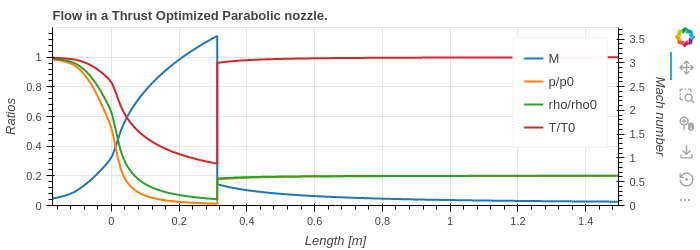
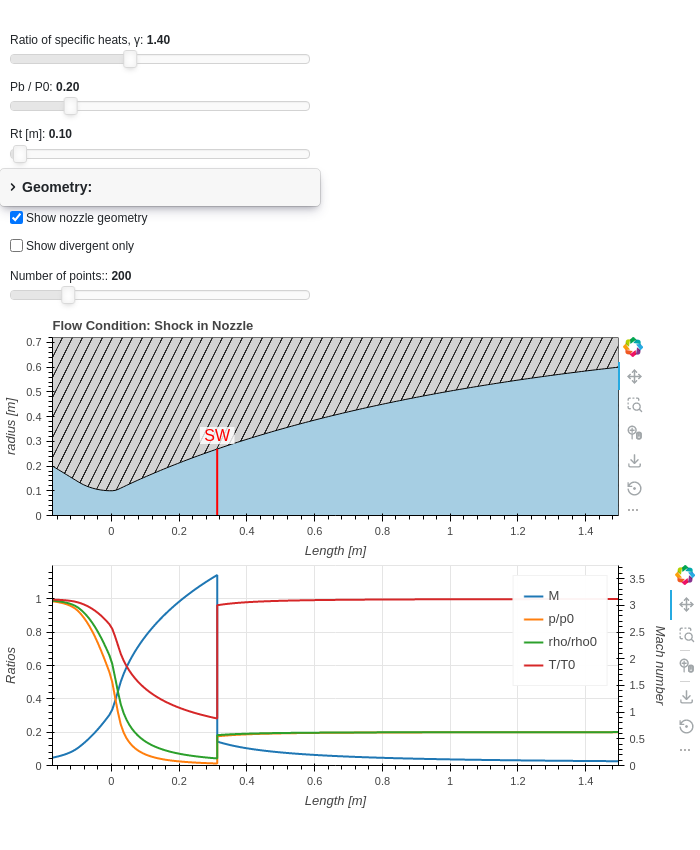
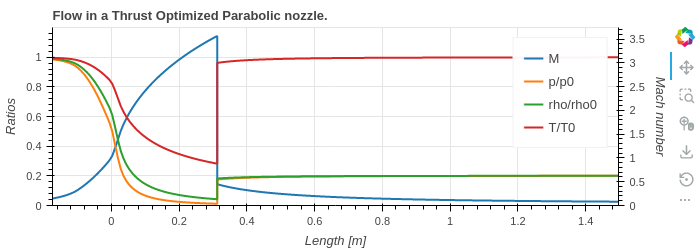
Interactive
Objectives of the interactive modules:
to have a web-based GUI (Graphical User Interface) always available to the user.
to simplify even further the use of
pygasflow.to make parametric visualizations easier than ever, thus improving the learning experience about quasi-1D ideal gasdynamic.
The interactive module is built with Holoviz Param and Panel. It is composed of several components:
Diagrams, used to visualize the general results of a particular solver.
Tabulators, used to visualize dataframes containing the numerical results of a particular solver.
Sections, composed of diagrams and/or tabulators.
Pages (or tabs), composed of different sections.
Overall application, composed of different pages (or tabs).
The following are the most important functions available to the users.
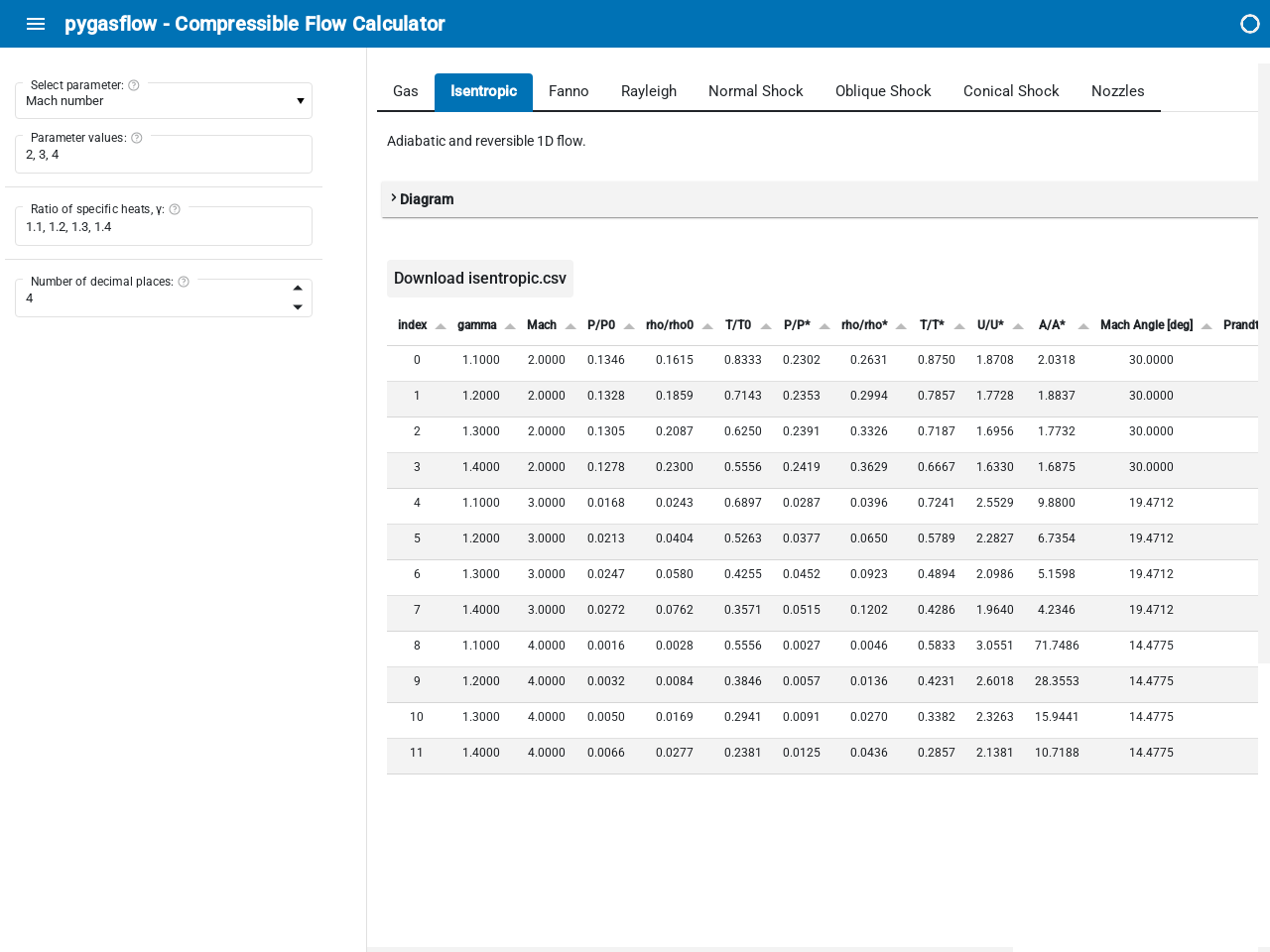
Applications
- pygasflow.interactive.compressible_app(theme='default')[source]
Create the ‘Compressible Flow Calculator’ web application.
Note that while the application works on a browser, all the computation is done with Python and the pygasflow module.
- Parameters:
- themestr
Can be
"default"(light theme) or"dark"for using a dark theme.
Examples
Launching a server from a command line. This is the content of a user-created file,
pygasflow_gui.py:from pygasflow.interactive import compressible_app compressible_app().servable()
Then, from the command line:
panel serve pygasflow_gui.py
Launching a server from Jupyter Notebook:
from pygasflow.interactive import compressible_app
app = compressible_app()
app.show()
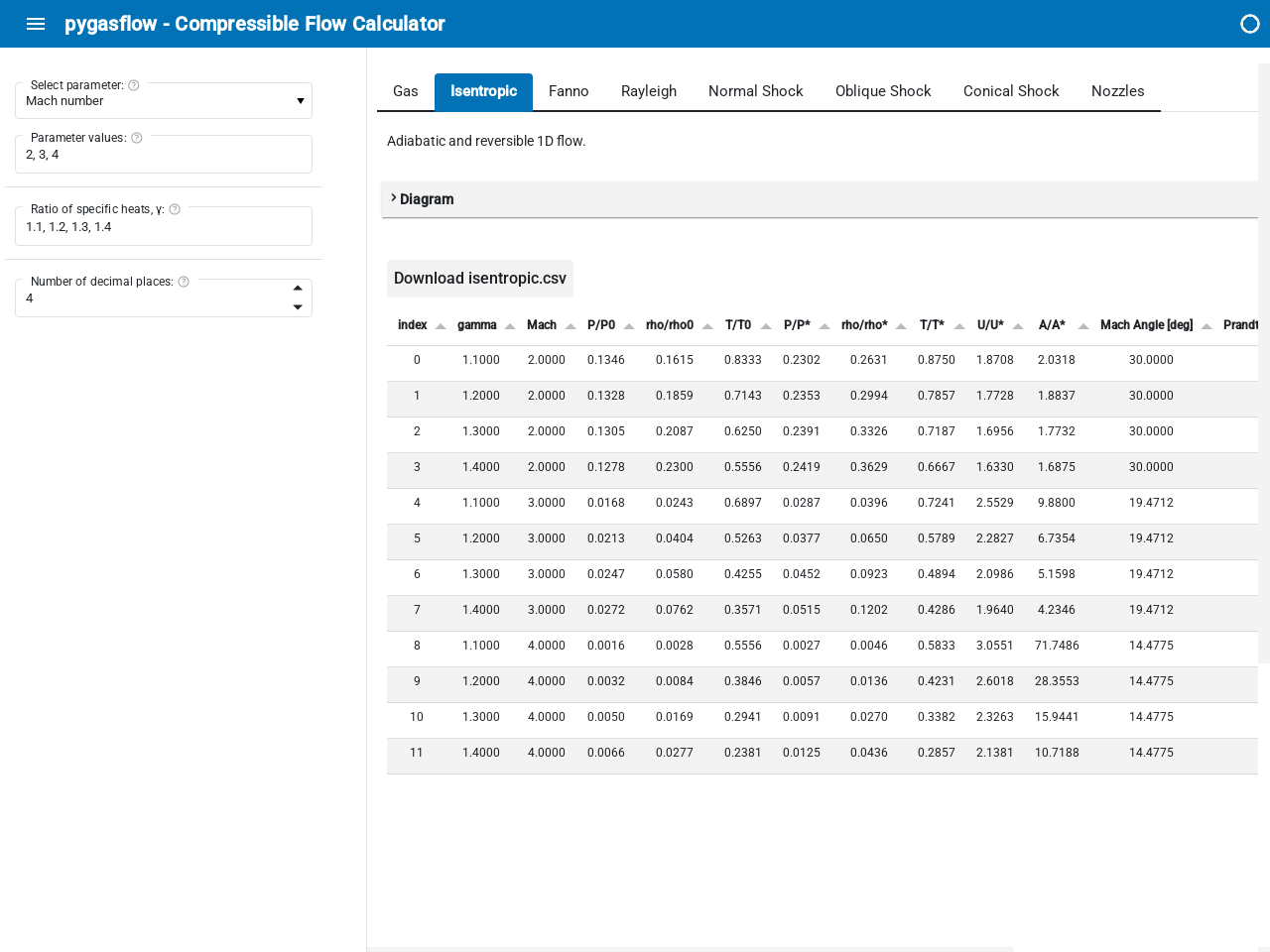
Diagrams
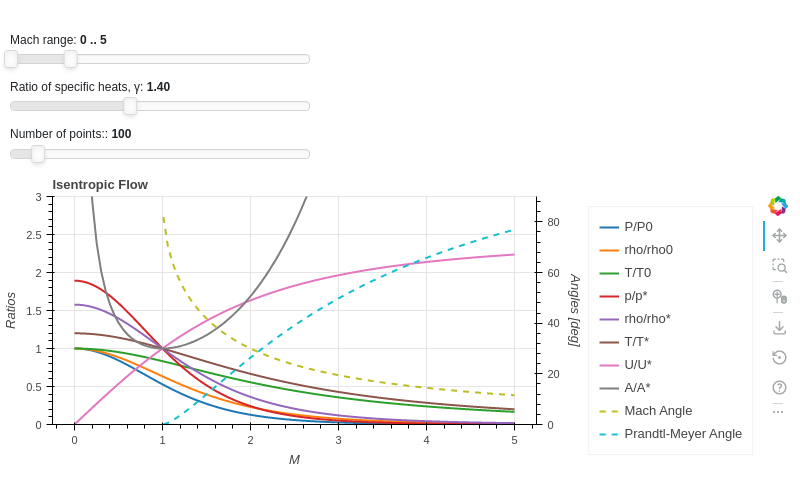
- class pygasflow.interactive.diagrams.IsentropicDiagram(*, angle_lines_kwargs, ratio_lines_kwargs, select, y_label_right, y_range_right, _parameter_name, _solver, mach_range, tooltips, N, gamma, labels, results, _theme, _update_func, colors, error_log, figure, legend, show_legend_outside, show_minor_grid, size, title, x_label, x_range, y_label, y_range, name)[source]
Interactive component to create a diagram for the isentropic flow.
- Parameters:
- figurebokeh.plotting._figure.figure
- allow_None:
True
The Bokeh figure to populate
- sizeTuple
- allow_None:
True
- default:
(800, 300)
- length:
2
Size of the plot, (width, height) in pixel.
- error_logString
- default:
Visualize any error that raises from the computation.
- colorsTuple
- default:
(‘#1f77b4’, ‘#ff7f0e’, ‘#2ca02c’, ‘#d62728’, ‘#9467bd’, ‘#8c564b’, ‘#e377c2’, ‘#7f7f7f’, ‘#bcbd22’, ‘#17becf’)
- length:
10
List of categorical colors.
- legendbokeh.models.annotations.legends.Legend
- allow_None:
True
The legend, when placed outside of the plotting area.
- titleString
- default:
- x_labelString
- default:
M
- y_labelString
- default:
Ratios
- x_rangeRange
- allow_None:
True
- inclusive_bounds:
(True, True)
- length:
2
- y_rangeRange
- allow_None:
True
- inclusive_bounds:
(True, True)
- length:
2
- show_minor_gridBoolean
- default:
False
Toggle minor grid visibility.
- show_legend_outsideBoolean
- default:
True
If True, the legend will be moved outside of the plotting area. In doing so, the legend items will become clickable, allowing user to hide a particular line.
- gammaNumber
- bounds:
gamma >= 1
- default:
1.4
γ = Cp / Cv
- NInteger
- bounds:
N >= 10
- default:
100
Number of points for each curve. It affects the quality of the visualization as well as the speed of updates.
- labelsList
- default:
[]
Labels to be used on the legend.
- resultsList
- default:
[]
Results of the computation.
- mach_rangeRange
- bounds:
(0, 25)
- default:
(0, 5)
- inclusive_bounds:
(True, True)
- length:
2
Minimum and Maximum Mach number for the visualization.
- tooltipsList
-
Tooltips used on each line of the plot.
- y_label_rightString
- default:
Angles [deg]
- y_range_rightRange
- bounds:
(0, 25)
- default:
(0, 3)
- inclusive_bounds:
(True, True)
- length:
2
- selectSelector
- default:
1
- names:
{‘Ratios + Angles’: 0, ‘Ratios’: 1, ‘Angles’: 2}
- objects:
[0, 1, 2]
Chose which diagram to show.
- angle_lines_kwargsDict
- default:
{}
Keyword arguments to customize the appearance of the Mach Angle and Prandtl-Meyer Angle.
- ratio_lines_kwargsDict
- default:
{}
Keyword arguments to customize the appearance of the ratios.
Examples
Show an interactive application:
from pygasflow.interactive.diagrams import IsentropicDiagram
IsentropicDiagram()
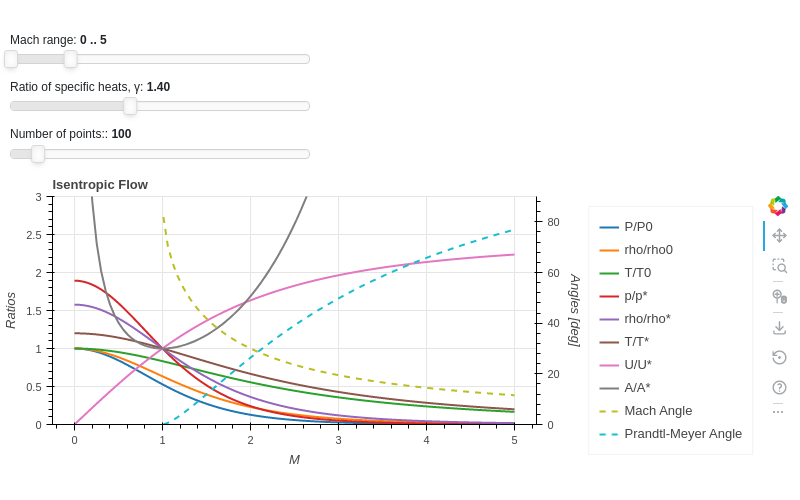
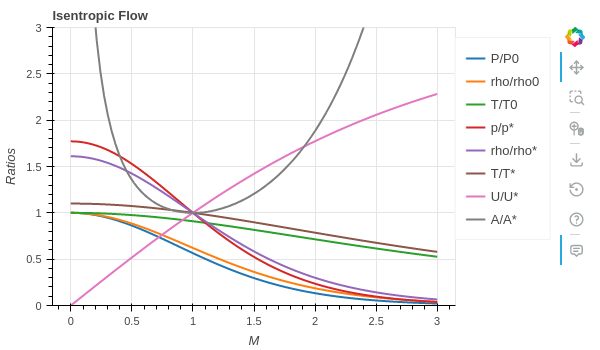
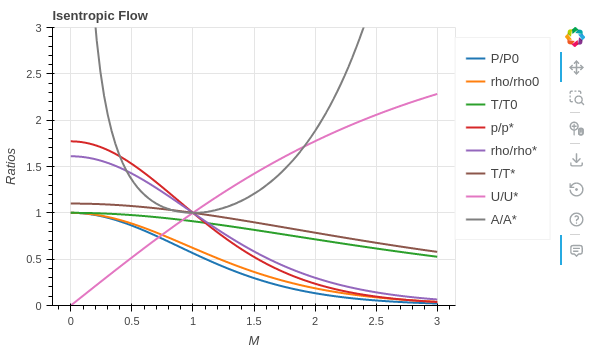
Set custom values to parameters and only show the figure about the ratios:
from pygasflow.interactive.diagrams import IsentropicDiagram
d = IsentropicDiagram(
    select=1,
    mach_range=(0, 3),
    gamma=1.2,
    size=(600, 350)
)
d.show_figure()
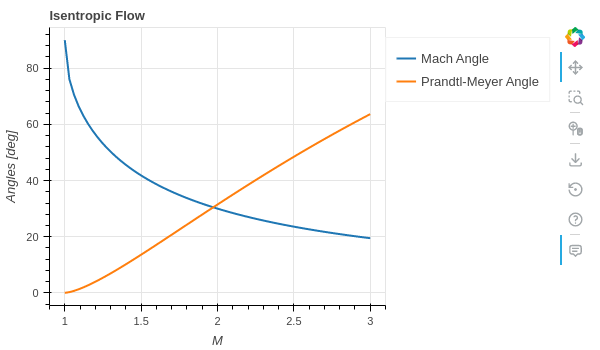
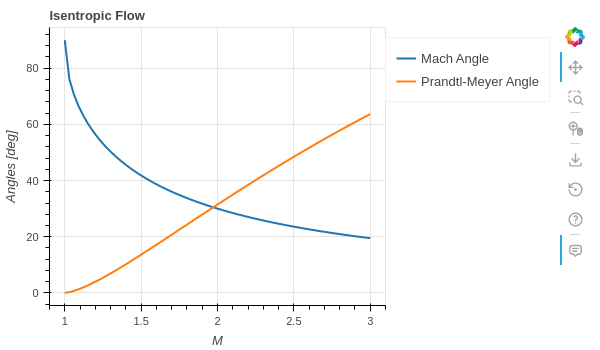
Set custom values to parameters and only show the figure about the angles:
from pygasflow.interactive.diagrams import IsentropicDiagram
d = IsentropicDiagram(
    select=2,
    mach_range=(0, 3),
    gamma=1.2,
    size=(600, 350),
    angle_lines_kwargs={"line_dash": "solid"}
)
d.show_figure()
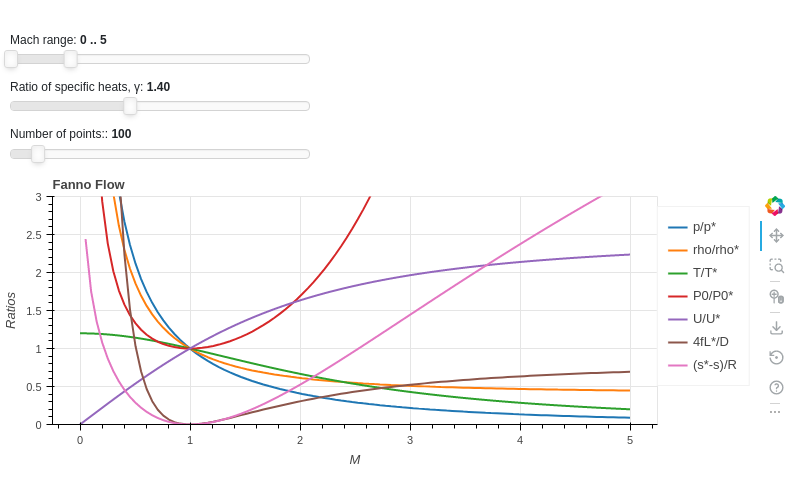
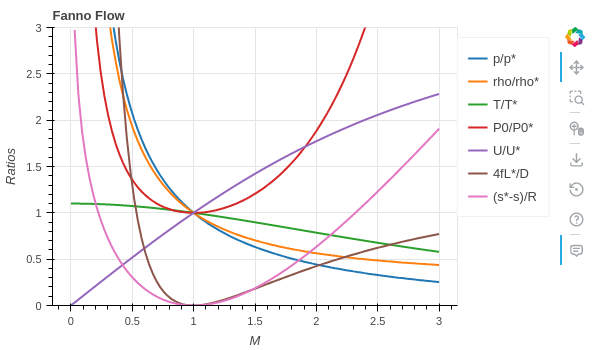
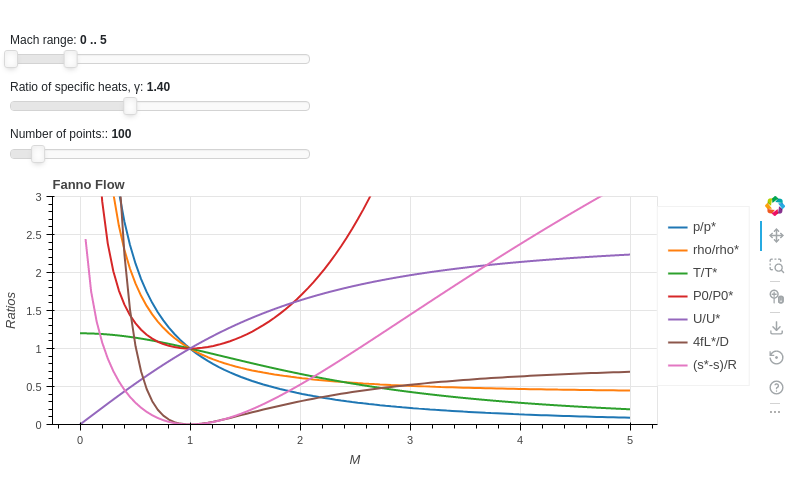
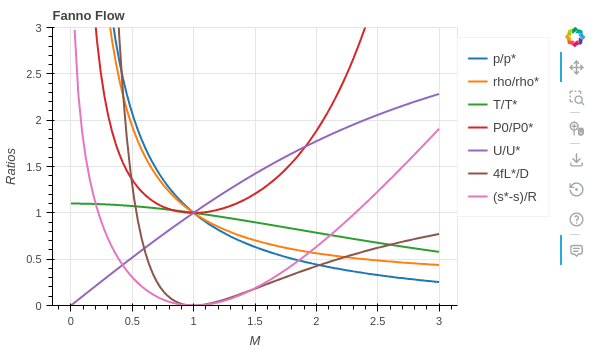
- class pygasflow.interactive.diagrams.FannoDiagram(*, _parameter_name, _solver, mach_range, tooltips, N, gamma, labels, results, _theme, _update_func, colors, error_log, figure, legend, show_legend_outside, show_minor_grid, size, title, x_label, x_range, y_label, y_range, name)[source]
Interactive component to create a diagram for the Fanno flow, ie the 1D flow with head addition.
- Parameters:
- figurebokeh.plotting._figure.figure
- allow_None:
True
The Bokeh figure to populate
- sizeTuple
- allow_None:
True
- default:
(800, 300)
- length:
2
Size of the plot, (width, height) in pixel.
- error_logString
- default:
Visualize any error that raises from the computation.
- colorsTuple
- default:
(‘#1f77b4’, ‘#ff7f0e’, ‘#2ca02c’, ‘#d62728’, ‘#9467bd’, ‘#8c564b’, ‘#e377c2’, ‘#7f7f7f’, ‘#bcbd22’, ‘#17becf’)
- length:
10
List of categorical colors.
- legendbokeh.models.annotations.legends.Legend
- allow_None:
True
The legend, when placed outside of the plotting area.
- titleString
- default:
- x_labelString
- default:
M
- y_labelString
- default:
Ratios
- x_rangeRange
- allow_None:
True
- inclusive_bounds:
(True, True)
- length:
2
- y_rangeRange
- allow_None:
True
- inclusive_bounds:
(True, True)
- length:
2
- show_minor_gridBoolean
- default:
False
Toggle minor grid visibility.
- show_legend_outsideBoolean
- default:
True
If True, the legend will be moved outside of the plotting area. In doing so, the legend items will become clickable, allowing user to hide a particular line.
- gammaNumber
- bounds:
gamma >= 1
- default:
1.4
γ = Cp / Cv
- NInteger
- bounds:
N >= 10
- default:
100
Number of points for each curve. It affects the quality of the visualization as well as the speed of updates.
- labelsList
- default:
[]
Labels to be used on the legend.
- resultsList
- default:
[]
Results of the computation.
- mach_rangeRange
- bounds:
(0, 25)
- default:
(0, 5)
- inclusive_bounds:
(True, True)
- length:
2
Minimum and Maximum Mach number for the visualization.
- tooltipsList
-
Tooltips used on each line of the plot.
Examples
Show an interactive application:
from pygasflow.interactive.diagrams import FannoDiagram
FannoDiagram()
Set custom values to parameters and only show the figure:
from pygasflow.interactive.diagrams import FannoDiagram
d = FannoDiagram(mach_range=(0, 3), gamma=1.2, size=(600, 350))
d.show_figure()
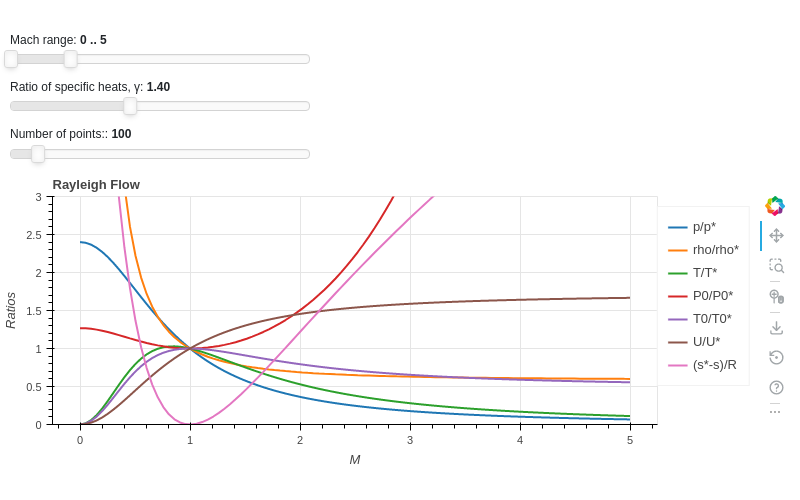
- class pygasflow.interactive.diagrams.RayleighDiagram(*, _parameter_name, _solver, mach_range, tooltips, N, gamma, labels, results, _theme, _update_func, colors, error_log, figure, legend, show_legend_outside, show_minor_grid, size, title, x_label, x_range, y_label, y_range, name)[source]
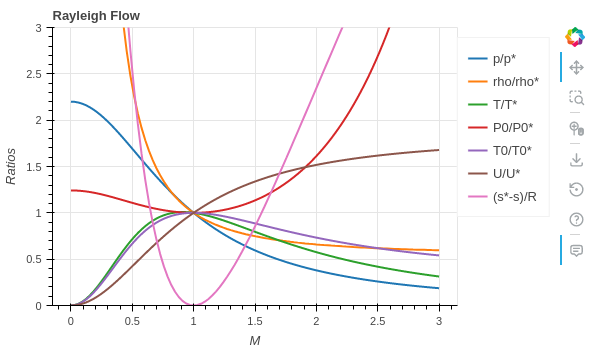
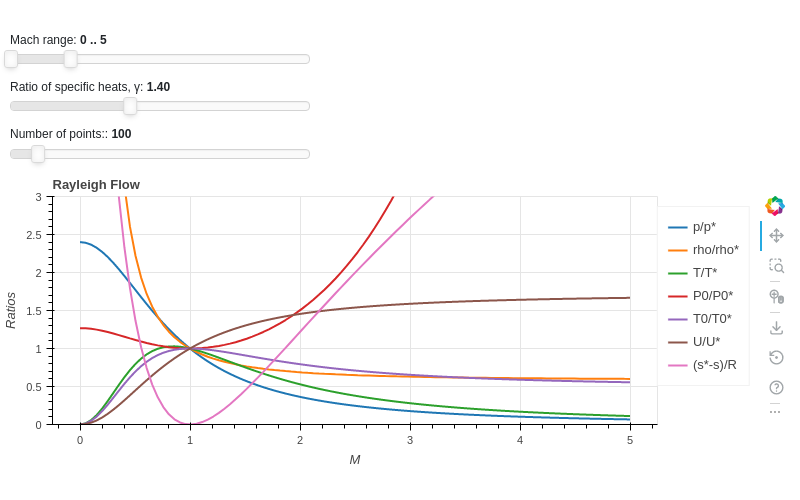
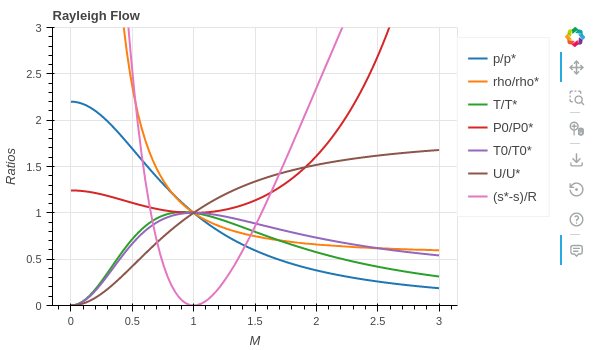
Interactive component to create a diagram for the Rayleigh flow, ie the 1D flow with friction.
- Parameters:
- figurebokeh.plotting._figure.figure
- allow_None:
True
The Bokeh figure to populate
- sizeTuple
- allow_None:
True
- default:
(800, 300)
- length:
2
Size of the plot, (width, height) in pixel.
- error_logString
- default:
Visualize any error that raises from the computation.
- colorsTuple
- default:
(‘#1f77b4’, ‘#ff7f0e’, ‘#2ca02c’, ‘#d62728’, ‘#9467bd’, ‘#8c564b’, ‘#e377c2’, ‘#7f7f7f’, ‘#bcbd22’, ‘#17becf’)
- length:
10
List of categorical colors.
- legendbokeh.models.annotations.legends.Legend
- allow_None:
True
The legend, when placed outside of the plotting area.
- titleString
- default:
- x_labelString
- default:
M
- y_labelString
- default:
Ratios
- x_rangeRange
- allow_None:
True
- inclusive_bounds:
(True, True)
- length:
2
- y_rangeRange
- allow_None:
True
- inclusive_bounds:
(True, True)
- length:
2
- show_minor_gridBoolean
- default:
False
Toggle minor grid visibility.
- show_legend_outsideBoolean
- default:
True
If True, the legend will be moved outside of the plotting area. In doing so, the legend items will become clickable, allowing user to hide a particular line.
- gammaNumber
- bounds:
gamma >= 1
- default:
1.4
γ = Cp / Cv
- NInteger
- bounds:
N >= 10
- default:
100
Number of points for each curve. It affects the quality of the visualization as well as the speed of updates.
- labelsList
- default:
[]
Labels to be used on the legend.
- resultsList
- default:
[]
Results of the computation.
- mach_rangeRange
- bounds:
(0, 25)
- default:
(0, 5)
- inclusive_bounds:
(True, True)
- length:
2
Minimum and Maximum Mach number for the visualization.
- tooltipsList
-
Tooltips used on each line of the plot.
Examples
Show an interactive application:
from pygasflow.interactive.diagrams import RayleighDiagram
RayleighDiagram()
Set custom values to parameters and only show the figure:
from pygasflow.interactive.diagrams import RayleighDiagram
d = RayleighDiagram(mach_range=(0, 3), gamma=1.2, size=(600, 350))
d.show_figure()
- class pygasflow.interactive.diagrams.NormalShockDiagram(*, dividers, _parameter_name, _solver, mach_range, tooltips, N, gamma, labels, results, _theme, _update_func, colors, error_log, figure, legend, show_legend_outside, show_minor_grid, size, title, x_label, x_range, y_label, y_range, name)[source]
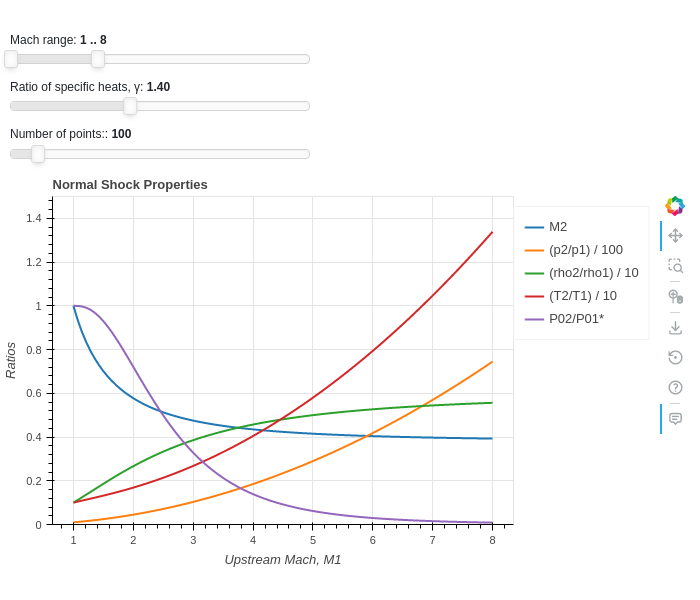
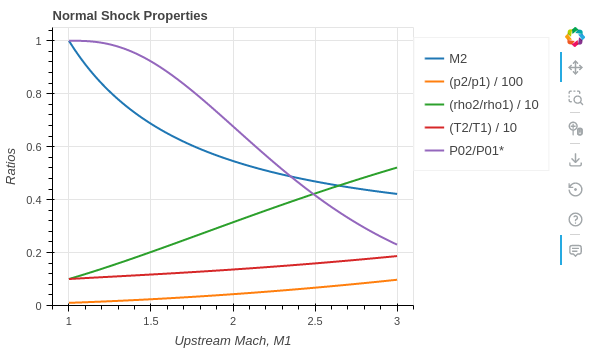
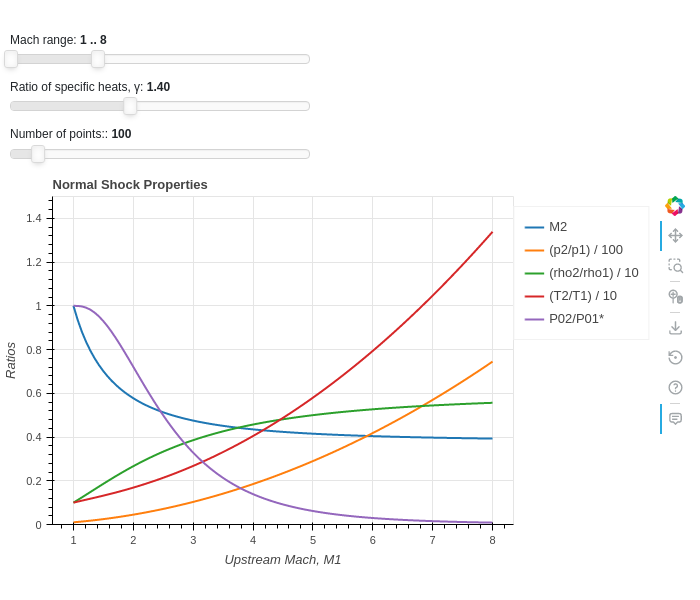
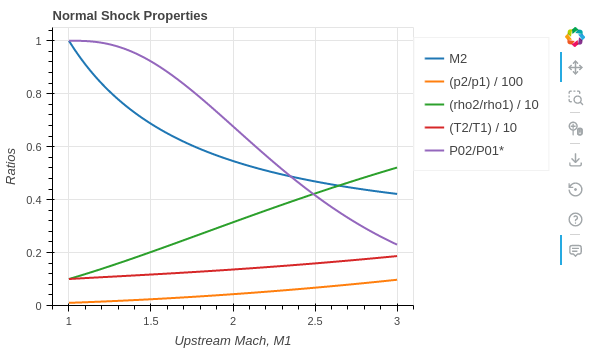
Interactive component to create a diagram for the properties of the flow as it crosses a normal shock wave.
- Parameters:
- figurebokeh.plotting._figure.figure
- allow_None:
True
The Bokeh figure to populate
- sizeTuple
- allow_None:
True
- default:
(800, 300)
- length:
2
Size of the plot, (width, height) in pixel.
- error_logString
- default:
Visualize any error that raises from the computation.
- colorsTuple
- default:
(‘#1f77b4’, ‘#ff7f0e’, ‘#2ca02c’, ‘#d62728’, ‘#9467bd’, ‘#8c564b’, ‘#e377c2’, ‘#7f7f7f’, ‘#bcbd22’, ‘#17becf’)
- length:
10
List of categorical colors.
- legendbokeh.models.annotations.legends.Legend
- allow_None:
True
The legend, when placed outside of the plotting area.
- titleString
- default:
- x_labelString
- default:
M
- y_labelString
- default:
Ratios
- x_rangeRange
- allow_None:
True
- inclusive_bounds:
(True, True)
- length:
2
- y_rangeRange
- allow_None:
True
- inclusive_bounds:
(True, True)
- length:
2
- show_minor_gridBoolean
- default:
False
Toggle minor grid visibility.
- show_legend_outsideBoolean
- default:
True
If True, the legend will be moved outside of the plotting area. In doing so, the legend items will become clickable, allowing user to hide a particular line.
- gammaNumber
- bounds:
gamma >= 1
- default:
1.4
γ = Cp / Cv
- NInteger
- bounds:
N >= 10
- default:
100
Number of points for each curve. It affects the quality of the visualization as well as the speed of updates.
- labelsList
- default:
[]
Labels to be used on the legend.
- resultsList
- default:
[]
Results of the computation.
- mach_rangeRange
- bounds:
(1, 25)
- default:
(1, 8)
- inclusive_bounds:
(True, True)
- length:
2
Minimum and Maximum Mach number for the visualization.
- tooltipsList
-
Tooltips used on each line of the plot.
- dividersList
- default:
[1, 100, 10, 10, 1]
Some ratios are going to be much bigger than others at the same upstream Mach number. Each number of this list represents a quotient for a particular ratio in order to “normalize” the visualization.
Examples
Show an interactive application:
from pygasflow.interactive.diagrams import NormalShockDiagram
NormalShockDiagram()
Set custom values to parameters and only show the figure:
from pygasflow.interactive.diagrams import NormalShockDiagram
d = NormalShockDiagram(
    mach_range=(1, 3), gamma=1.2, size=(600, 350), y_range=(0, 1.05))
d.show_figure()
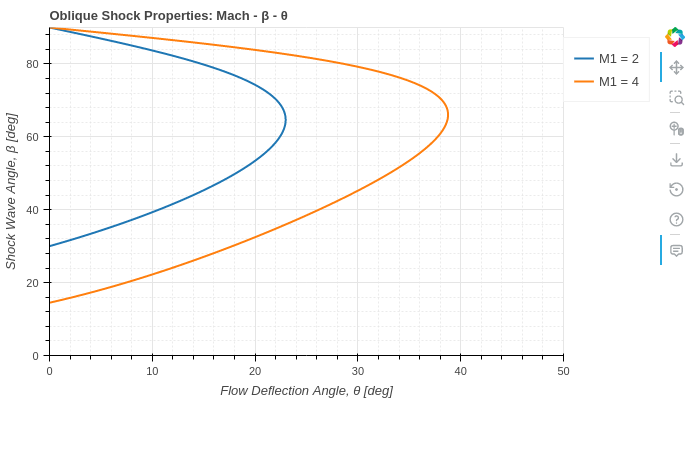
- class pygasflow.interactive.diagrams.ObliqueShockDiagram(*, _additional_mach_lines, _region_line, _sonic_line, _upstream_mach_lines, add_region_line, add_sonic_line, add_upstream_mach, additional_upstream_mach, tooltips, upstream_mach, N, gamma, labels, results, _theme, _update_func, colors, error_log, figure, legend, show_legend_outside, show_minor_grid, size, title, x_label, x_range, y_label, y_range, name)[source]
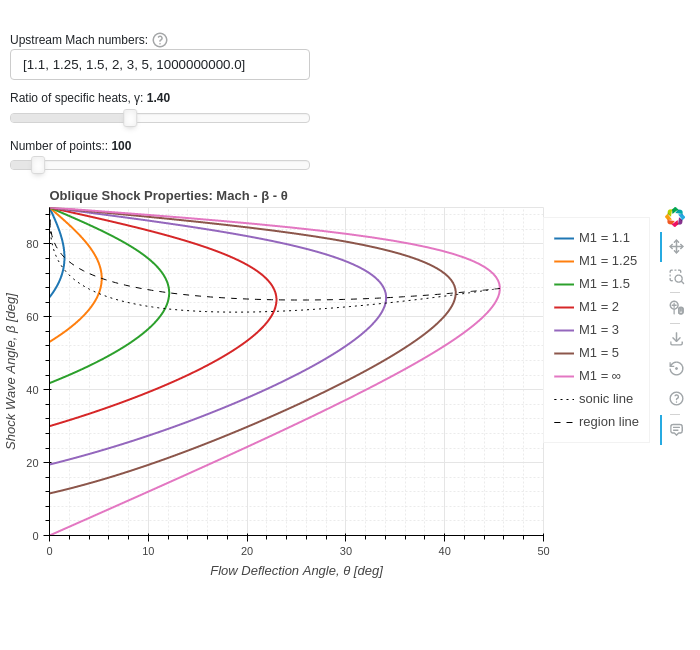
Interactive component to create a diagram for the properties of the flow as it crosses an oblique shock wave.
- Parameters:
- figurebokeh.plotting._figure.figure
- allow_None:
True
The Bokeh figure to populate
- sizeTuple
- allow_None:
True
- default:
(800, 300)
- length:
2
Size of the plot, (width, height) in pixel.
- error_logString
- default:
Visualize any error that raises from the computation.
- colorsTuple
- default:
(‘#1f77b4’, ‘#ff7f0e’, ‘#2ca02c’, ‘#d62728’, ‘#9467bd’, ‘#8c564b’, ‘#e377c2’, ‘#7f7f7f’, ‘#bcbd22’, ‘#17becf’)
- length:
10
List of categorical colors.
- legendbokeh.models.annotations.legends.Legend
- allow_None:
True
The legend, when placed outside of the plotting area.
- titleString
- default:
- x_labelString
- default:
M
- y_labelString
- default:
Ratios
- x_rangeRange
- allow_None:
True
- inclusive_bounds:
(True, True)
- length:
2
- y_rangeRange
- allow_None:
True
- inclusive_bounds:
(True, True)
- length:
2
- show_minor_gridBoolean
- default:
False
Toggle minor grid visibility.
- show_legend_outsideBoolean
- default:
True
If True, the legend will be moved outside of the plotting area. In doing so, the legend items will become clickable, allowing user to hide a particular line.
- gammaNumber
- bounds:
gamma >= 1
- default:
1.4
γ = Cp / Cv
- NInteger
- bounds:
N >= 10
- default:
100
Number of points for each curve. It affects the quality of the visualization as well as the speed of updates.
- labelsList
- default:
[]
Labels to be used on the legend.
- resultsList
- default:
[]
Results of the computation.
- upstream_machList
- length:
7
- default:
[1.1, 1.5, 2, 3, 5, 10, 1000000000.0]
- item_type:
(float, int)
Comma separated list of 7 upstream Mach numbers to be shown.
- additional_upstream_machList
- default:
[]
- item_type:
numbers.Number
User can provides additional upstream Mach numbers to be plotted on the chart. This parameter must be set at instantiation and should be changed afterwards.
- add_upstream_machBoolean
- default:
True
If True, add the default upstream Mach numbers to the chart. Otherwise, only add the additional user-provided Mach numbers. This parameter must be set at instantiation and should be changed afterwards.
- add_sonic_lineBoolean
- default:
True
Add the line where the downstream Mach number is M2=1. This parameter must be set at instantiation and should be changed afterwards.
- add_region_lineBoolean
- default:
True
Add the line separating the strong solution from the weak solution. This parameter must be set at instantiation and should be changed afterwards.
- tooltipsList
- default:
[(‘Variable’, ‘@v’), (‘θ’, ‘@x’), (‘β’, ‘@y’), (‘Region’, ‘@r’)]
Tooltips used on each line of the plot.
Examples
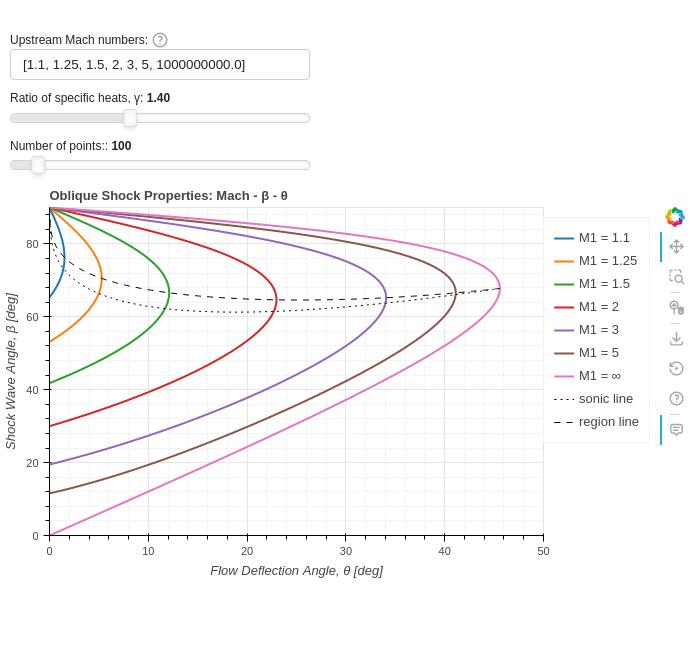
Show an interactive application:
from pygasflow.interactive.diagrams import ObliqueShockDiagram
ObliqueShockDiagram()
Set custom values to parameters, hide sonic and region lines, and only show the figure:
from pygasflow.interactive.diagrams import ObliqueShockDiagram
d = ObliqueShockDiagram(
    upstream_mach=[1.1, 1.35, 1.75, 2.25, 3.5, 6, 1e06],
    gamma=1.2,
    add_region_line=False,
    add_sonic_line=False,
    title="Oblique Shock Properties for γ=1.2",
    N=1000
)
d.show_figure()
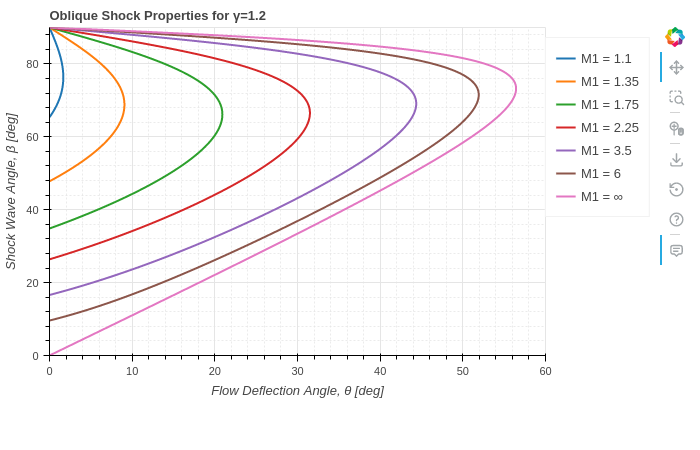
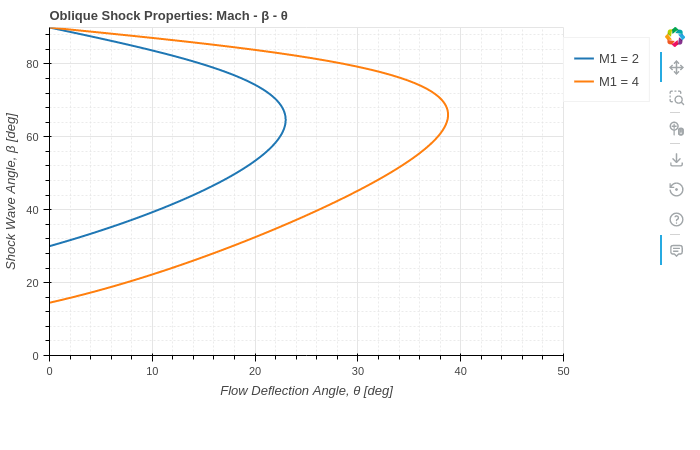
Only shows user-specified upstream Mach numbers:
from pygasflow.interactive.diagrams import ObliqueShockDiagram
d = ObliqueShockDiagram(
    add_upstream_mach=False,
    add_region_line=False,
    add_sonic_line=False,
    additional_upstream_mach=[2, 4],
)
d.show_figure()
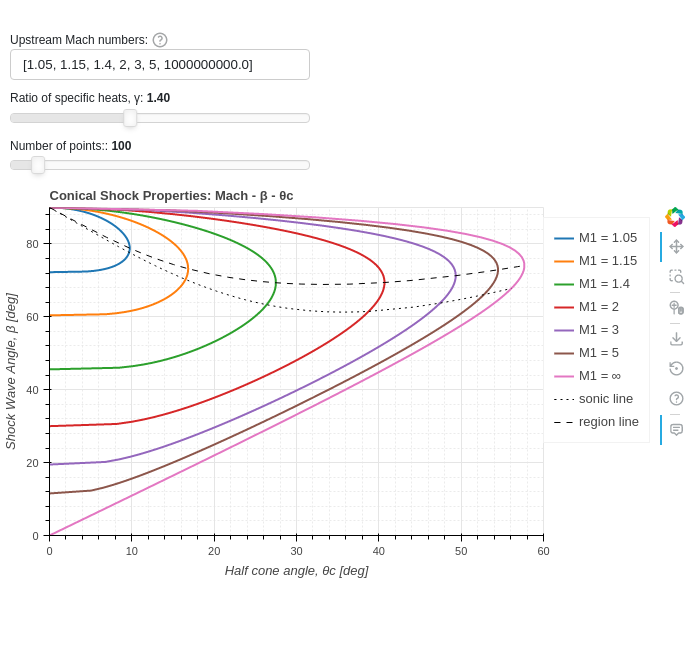
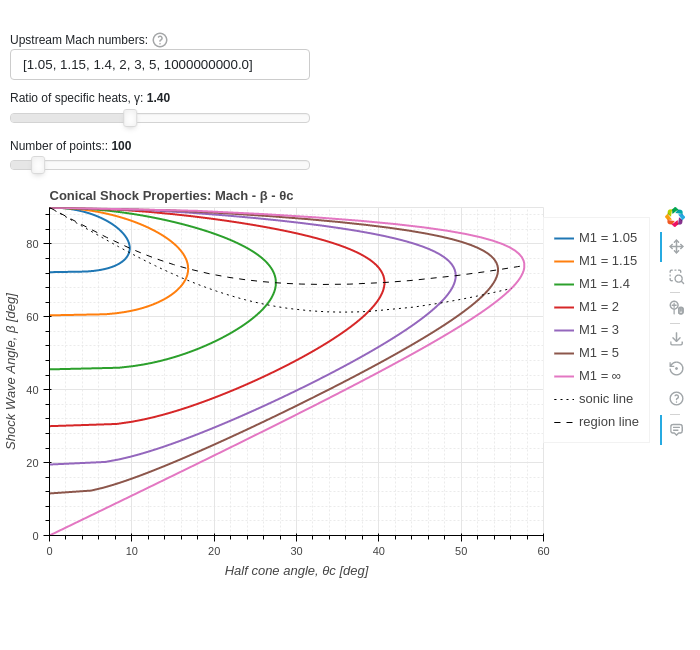
- class pygasflow.interactive.diagrams.ConicalShockDiagram(*, _additional_mach_lines, _region_line, _sonic_line, _upstream_mach_lines, add_region_line, add_sonic_line, add_upstream_mach, additional_upstream_mach, tooltips, upstream_mach, N, gamma, labels, results, _theme, _update_func, colors, error_log, figure, legend, show_legend_outside, show_minor_grid, size, title, x_label, x_range, y_label, y_range, name)[source]
Interactive component to create a diagram for the properties of the axisymmetric supersonic flow over a sharp cone at zero angle of attack to the free stream.
- Parameters:
- figurebokeh.plotting._figure.figure
- allow_None:
True
The Bokeh figure to populate
- sizeTuple
- allow_None:
True
- default:
(800, 300)
- length:
2
Size of the plot, (width, height) in pixel.
- error_logString
- default:
Visualize any error that raises from the computation.
- colorsTuple
- default:
(‘#1f77b4’, ‘#ff7f0e’, ‘#2ca02c’, ‘#d62728’, ‘#9467bd’, ‘#8c564b’, ‘#e377c2’, ‘#7f7f7f’, ‘#bcbd22’, ‘#17becf’)
- length:
10
List of categorical colors.
- legendbokeh.models.annotations.legends.Legend
- allow_None:
True
The legend, when placed outside of the plotting area.
- titleString
- default:
- x_labelString
- default:
M
- y_labelString
- default:
Ratios
- x_rangeRange
- allow_None:
True
- inclusive_bounds:
(True, True)
- length:
2
- y_rangeRange
- allow_None:
True
- inclusive_bounds:
(True, True)
- length:
2
- show_minor_gridBoolean
- default:
False
Toggle minor grid visibility.
- show_legend_outsideBoolean
- default:
True
If True, the legend will be moved outside of the plotting area. In doing so, the legend items will become clickable, allowing user to hide a particular line.
- gammaNumber
- bounds:
gamma >= 1
- default:
1.4
γ = Cp / Cv
- NInteger
- bounds:
N >= 10
- default:
100
Number of points for each curve. It affects the quality of the visualization as well as the speed of updates.
- labelsList
- default:
[]
Labels to be used on the legend.
- resultsList
- default:
[]
Results of the computation.
- upstream_machList
- length:
7
- default:
[1.1, 1.5, 2, 3, 5, 10, 1000000000.0]
- item_type:
(float, int)
Comma separated list of 7 upstream Mach numbers to be shown.
- additional_upstream_machList
- default:
[]
- item_type:
numbers.Number
User can provides additional upstream Mach numbers to be plotted on the chart. This parameter must be set at instantiation and should be changed afterwards.
- add_upstream_machBoolean
- default:
True
If True, add the default upstream Mach numbers to the chart. Otherwise, only add the additional user-provided Mach numbers. This parameter must be set at instantiation and should be changed afterwards.
- add_sonic_lineBoolean
- default:
True
Add the line where the downstream Mach number is M2=1. This parameter must be set at instantiation and should be changed afterwards.
- add_region_lineBoolean
- default:
True
Add the line separating the strong solution from the weak solution. This parameter must be set at instantiation and should be changed afterwards.
- tooltipsList
- default:
[(‘Variable’, ‘@v’), (‘θ’, ‘@x’), (‘β’, ‘@y’), (‘Region’, ‘@r’)]
Tooltips used on each line of the plot.
Examples
Show an interactive application:
from pygasflow.interactive.diagrams import ConicalShockDiagram
ConicalShockDiagram()
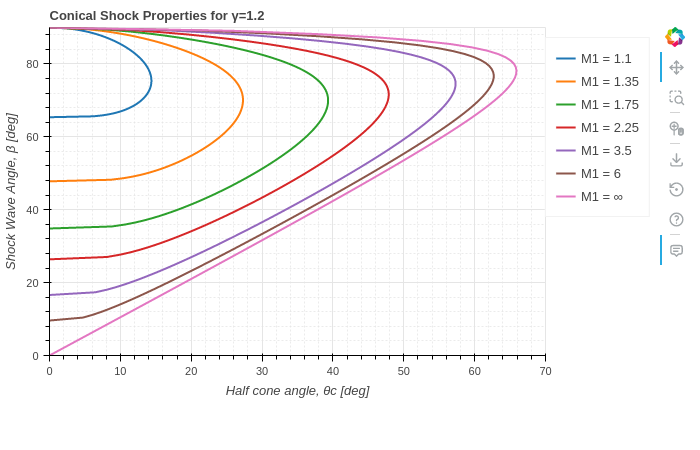
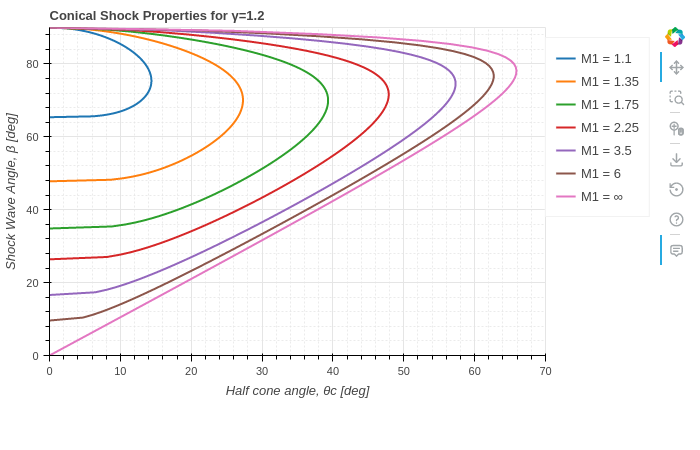
Set custom values to parameters, hide sonic and region lines, and only show the figure:
from pygasflow.interactive.diagrams import ConicalShockDiagram
d = ConicalShockDiagram(
    upstream_mach=[1.1, 1.35, 1.75, 2.25, 3.5, 6, 1e06],
    gamma=1.2,
    add_region_line=False,
    add_sonic_line=False,
    title="Conical Shock Properties for γ=1.2"
)
d.show_figure()
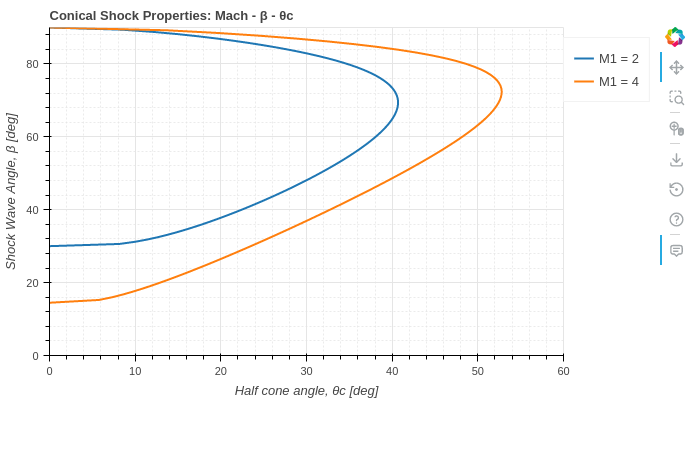
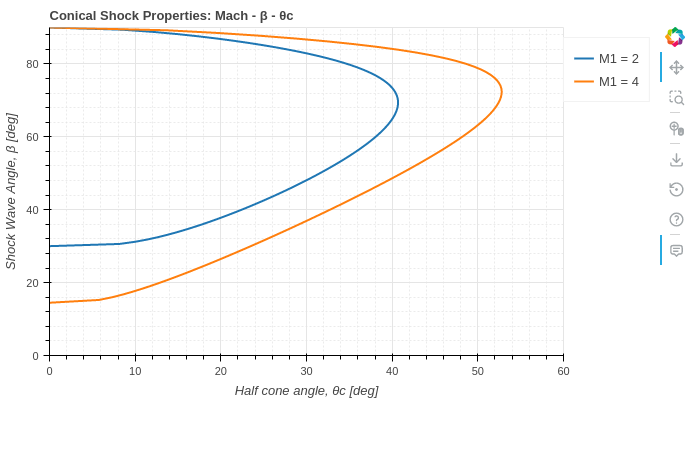
Only shows user-specified upstream Mach numbers:
from pygasflow.interactive.diagrams import ConicalShockDiagram
d = ConicalShockDiagram(
    add_upstream_mach=False,
    add_region_line=False,
    add_sonic_line=False,
    additional_upstream_mach=[2, 4],
)
d.show_figure()
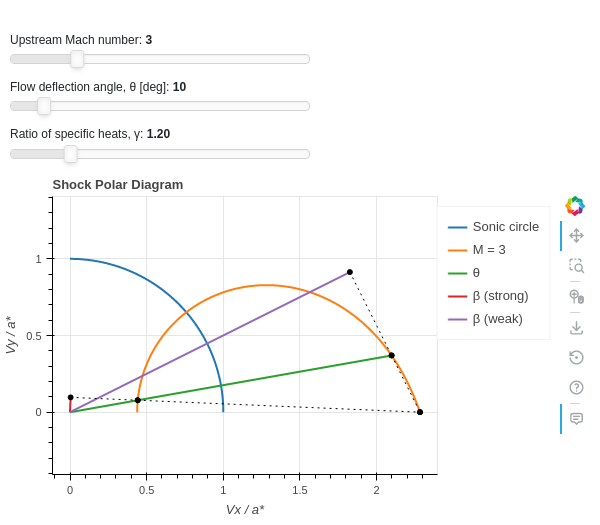
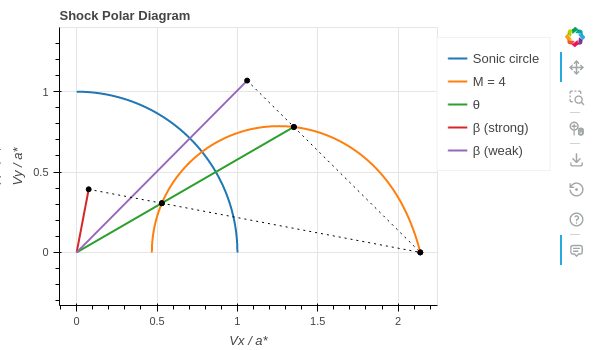
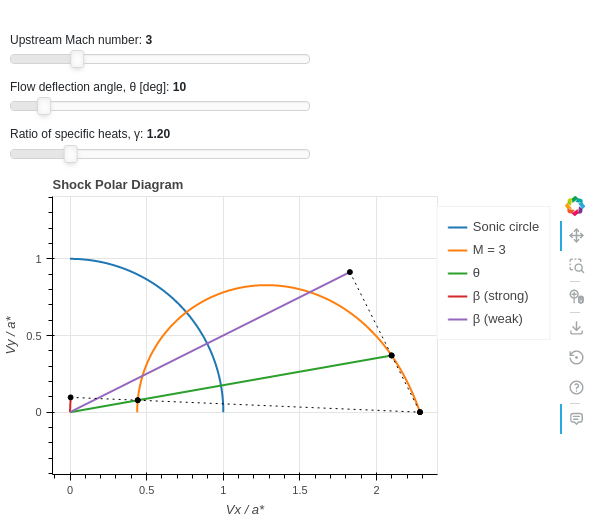
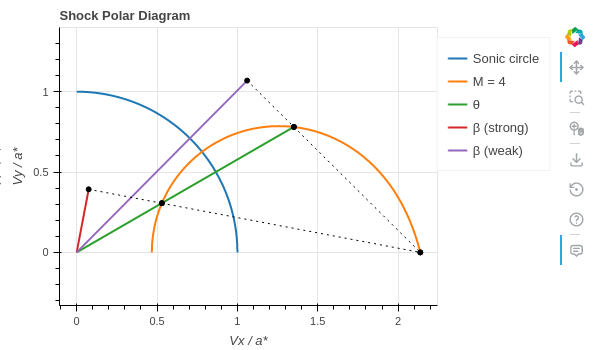
- class pygasflow.interactive.diagrams.ShockPolarDiagram(*, _beta_strong_line, _beta_weak_line, _helper_line_1, _helper_line_2, _helper_line_3, _helper_line_4, _helper_scatter_1, _helper_scatter_22, _helper_scatter_3, _helper_scatter_4, _mach_inf, _mach_line, _sonic_circle, _theta_line, characteristic_mach_number, helper_line_kwargs, helper_scatter_kwargs, include_mirror, mach_number, show_beta_line, show_mach_at_infinity, show_sonic_circle, show_theta_line, theta, theta_max, N, gamma, labels, results, _theme, _update_func, colors, error_log, figure, legend, show_legend_outside, show_minor_grid, size, title, x_label, x_range, y_label, y_range, name)[source]
Create a shock polar diagram.
- Parameters:
- figurebokeh.plotting._figure.figure
- allow_None:
True
The Bokeh figure to populate
- sizeTuple
- allow_None:
True
- default:
(800, 300)
- length:
2
Size of the plot, (width, height) in pixel.
- error_logString
- default:
Visualize any error that raises from the computation.
- colorsTuple
- default:
(‘#1f77b4’, ‘#ff7f0e’, ‘#2ca02c’, ‘#d62728’, ‘#9467bd’, ‘#8c564b’, ‘#e377c2’, ‘#7f7f7f’, ‘#bcbd22’, ‘#17becf’)
- length:
10
List of categorical colors.
- legendbokeh.models.annotations.legends.Legend
- allow_None:
True
The legend, when placed outside of the plotting area.
- titleString
- default:
- x_labelString
- default:
M
- y_labelString
- default:
Ratios
- x_rangeRange
- allow_None:
True
- inclusive_bounds:
(True, True)
- length:
2
- y_rangeRange
- allow_None:
True
- inclusive_bounds:
(True, True)
- length:
2
- show_minor_gridBoolean
- default:
False
Toggle minor grid visibility.
- show_legend_outsideBoolean
- default:
True
If True, the legend will be moved outside of the plotting area. In doing so, the legend items will become clickable, allowing user to hide a particular line.
- gammaNumber
- bounds:
gamma >= 1
- default:
1.4
γ = Cp / Cv
- NInteger
- bounds:
N >= 10
- default:
100
Number of points for each curve. It affects the quality of the visualization as well as the speed of updates.
- labelsList
- default:
[]
Labels to be used on the legend.
- resultsList
- default:
[]
Results of the computation.
- show_mach_at_infinityBoolean
- default:
False
Toggle the visibility of the curve at Mach infinity.
- show_theta_lineBoolean
- default:
True
Show the line representing the deflection angle, θ.
- show_beta_lineBoolean
- default:
True
Show the line representing the shock wave angle, β.
- show_sonic_circleBoolean
- default:
True
Show the line representing the sonic circle.
- mach_numberNumber
- bounds:
mach_number >= 1
- default:
5
Mach number to represent on the diagram.
- thetaNumber
- bounds:
\(0 \le \theta \le 90\)
- default:
15
Flow deflection angle, θ [deg]
- include_mirrorBoolean
- default:
False
If True, shows results both on +Y and -Y axis.
- characteristic_mach_numberNumber
- read only:
True
Get the characteristic upstream Mach number.
- theta_maxNumber
- read only:
True
Get the maximum deflection angle associated with the current upstream Mach number.
- helper_line_kwargsDict
- default:
{}
Rendering keywords for helper lines.
- helper_scatter_kwargsDict
- default:
{}
Rendering keywords for helper lines.
Examples
Show an interactive application:
from pygasflow.interactive.diagrams import ShockPolarDiagram
ShockPolarDiagram(mach_number=3, gamma=1.2, theta=10)
Set custom values to parameters and only show the figure:
from pygasflow.interactive.diagrams import ShockPolarDiagram
d = ShockPolarDiagram(mach_number=4, gamma=1.4, theta=30)
d.show_figure()
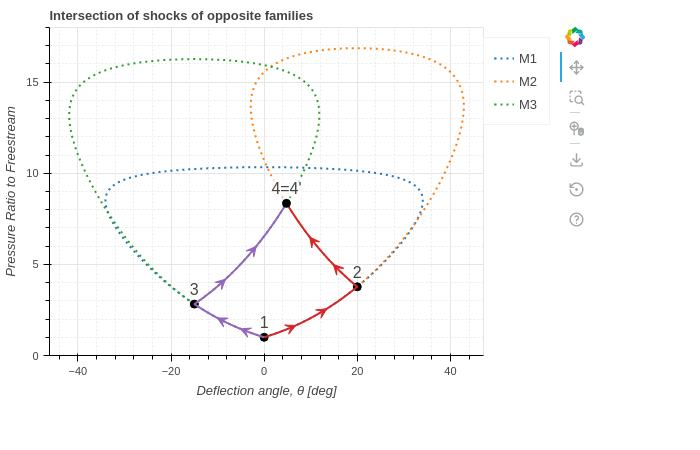
- class pygasflow.interactive.diagrams.PressureDeflectionDiagram(*, _theme, _update_func, colors, error_log, figure, legend, show_legend_outside, show_minor_grid, size, title, x_label, x_range, y_label, y_range, name)[source]
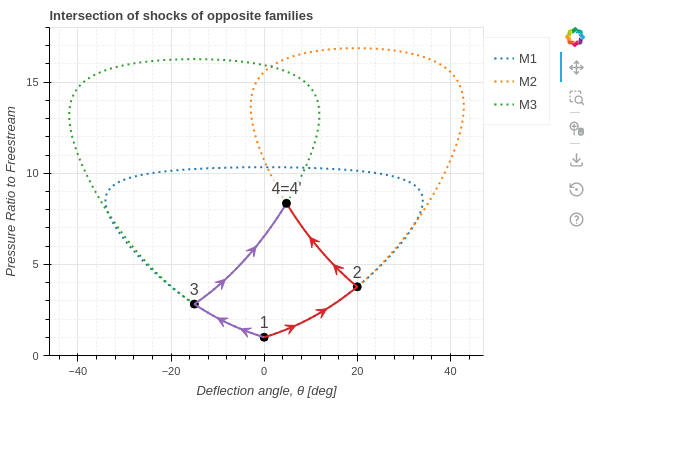
Creates a pressure-deflection diagram.
- Parameters:
- figurebokeh.plotting._figure.figure
- allow_None:
True
The Bokeh figure to populate
- sizeTuple
- allow_None:
True
- default:
(800, 300)
- length:
2
Size of the plot, (width, height) in pixel.
- error_logString
- default:
Visualize any error that raises from the computation.
- colorsTuple
- default:
(‘#1f77b4’, ‘#ff7f0e’, ‘#2ca02c’, ‘#d62728’, ‘#9467bd’, ‘#8c564b’, ‘#e377c2’, ‘#7f7f7f’, ‘#bcbd22’, ‘#17becf’)
- length:
10
List of categorical colors.
- legendbokeh.models.annotations.legends.Legend
- allow_None:
True
The legend, when placed outside of the plotting area.
- titleString
- default:
- x_labelString
- default:
M
- y_labelString
- default:
Ratios
- x_rangeRange
- allow_None:
True
- inclusive_bounds:
(True, True)
- length:
2
- y_rangeRange
- allow_None:
True
- inclusive_bounds:
(True, True)
- length:
2
- show_minor_gridBoolean
- default:
False
Toggle minor grid visibility.
- show_legend_outsideBoolean
- default:
True
If True, the legend will be moved outside of the plotting area. In doing so, the legend items will become clickable, allowing user to hide a particular line.
Examples
from pygasflow.shockwave import PressureDeflectionLocus
from pygasflow.interactive import PressureDeflectionDiagram

M1 = 3
theta_2 = 20
theta_3 = -15

loc1 = PressureDeflectionLocus(M=M1, label="1")
loc2 = loc1.new_locus_from_shockwave(theta_2, label="2")
loc3 = loc1.new_locus_from_shockwave(theta_3, label="3")

phi, p4_p1 = loc2.intersection(loc3)
print("Intersection between locus M2 and locus M3 happens at:")
print("Deflection Angle [deg]:", phi)
print("Pressure ratio to freestream:", p4_p1)

d = PressureDeflectionDiagram(
    title="Intersection of shocks of opposite families"
)
d.add_locus(loc1)
d.add_locus(loc2)
d.add_locus(loc3)
d.add_path((loc1, theta_2), (loc2, phi))
d.add_path((loc1, theta_3), (loc3, phi))
d.add_state(
    phi, p4_p1, "4=4'",
    background_fill_color="white",
    background_fill_alpha=0.8)
d.move_legend_outside()
d.y_range = (0, 18)
d.show_figure()
- add_locus(locus, show_state=True, N=100, include_mirror=True, **kwargs)[source]
Add the locus to the diagram, with a single line.
- Parameters:
- locus
PressureDeflectionLocus - show_statebool
If True, also add a text on the diagram at the start of the locus.
- Nint
Number of discretization points.
- include_mirrorbool
If False, only plot the locus for theta >= 0.
- **kwargs
Keyword arguments passed to
bokeh.models.Line
- locus
- Returns:
- line_rend
bokeh.models.GlyphRenderer - lbl
bokeh.models.Labelor None - circle_rend
bokeh.models.GlyphRendereror None
- line_rend
- add_locus_split(locus, weak_kwargs={}, strong_kwargs={}, same_color=True, show_state=True, mode='region', N=100, include_mirror=True)[source]
Add the locus to the diagram, with two lines, one for the weak region and the other for the strong region.
- Parameters:
- locus
PressureDeflectionLocus - show_statebool
If True, also add a text on the diagram at the start of the locus.
- weak_kwargsdict
Keyword arguments passed to
bokeh.models.Linein order to customize the line for the weak region.- strong_kwargsdict
Keyword arguments passed to
bokeh.models.Linein order to customize the line for the strong region.- same_colorbool
Wheter the two lines uses the same color.
- show_statebool
If True, also add a text on the diagram at the start of the locus.
- modestr
Split the locus at some point. It can be:
"region": the locus is splitted at the detachment point, wheretheta=theta_max."sonic": the locus is splitted at the sonic point (where the downstream Mach number is 1).
- Nint
Number of discretization points.
- include_mirrorbool
If False, only plot the locus for theta >= 0.
- locus
- Returns:
- line_rend_weak
bokeh.models.GlyphRenderer - line_rend_strong
bokeh.models.GlyphRenderer - lbl
bokeh.models.Labelor None - circle_rend
bokeh.models.GlyphRendereror None
- line_rend_weak
- add_path(*segments, num_arrows=2, **kwargs)[source]
Add a path connecting one or more segments.
- Parameters:
- segmentstuples
Each segment is a 2-elements tuple where the first element is a PressureDeflectionLocus, and the second element is the deflection angle [degrees] of the end of the segment.
- num_arrowsint
Number of arrows to add over the each segment.
- **kwargs
Keyword arguments passed to
bokeh.models.Line.
- Returns:
- rend
bokeh.models.GlyphRenderer - arrows
bokeh.models.Arrow
- rend
- add_state(theta, pr, text, primary_line=None, circle_kw=None, **kwargs)[source]
Add text to the specified point (x, y) in the diagram.
- Parameters:
- thetafloat
Flow deflection angle in degrees.
- prfloat
Pressure ratio to freestream.
- textstr
- primary_lineNone or Renderer
If a Bokeh renderer is provided, its visibility will be linked to the label’s visibility. Useful to hide the label when the visibility of
primary_lineis toggled on the legend.- circle_kwNone or dict
Keyword arguments to
bokeh.models.Circle.- **kwargs
Keyword arguments passed to
bokeh.models.Label.
- Returns:
- lbl
bokeh.models.Label - circle_rend
bokeh.models.GlyphRenderer
- lbl
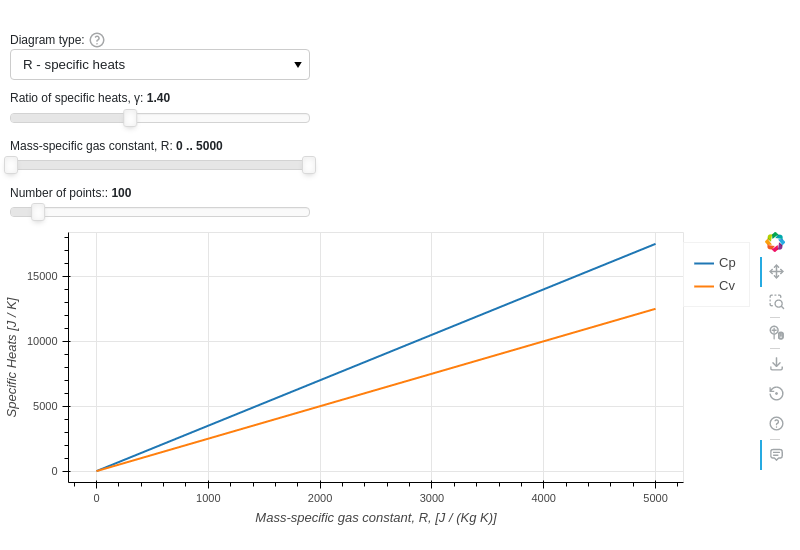
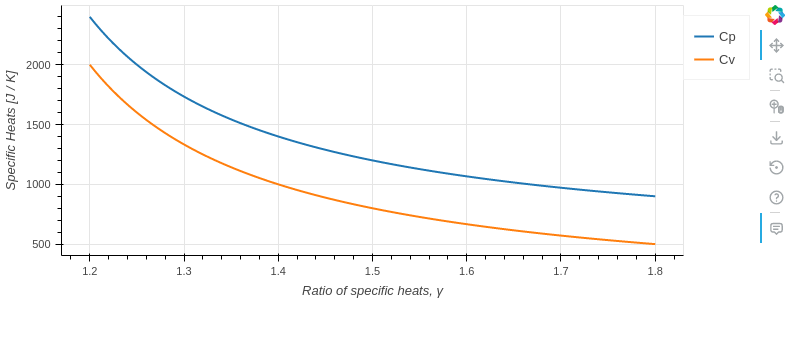
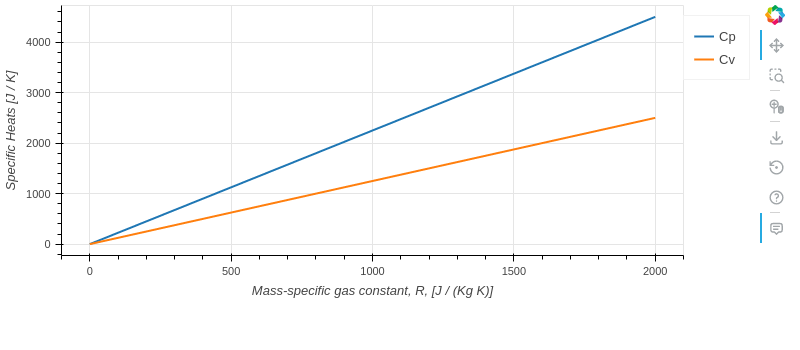
- class pygasflow.interactive.diagrams.GasDiagram(*, N, R, R_range, gamma, gamma_range, select, _theme, _update_func, colors, error_log, figure, legend, show_legend_outside, show_minor_grid, size, title, x_label, x_range, y_label, y_range, name)[source]
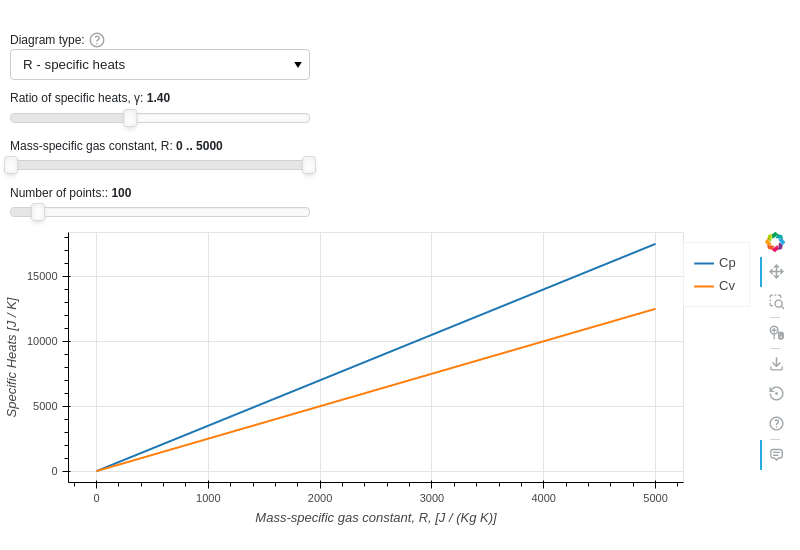
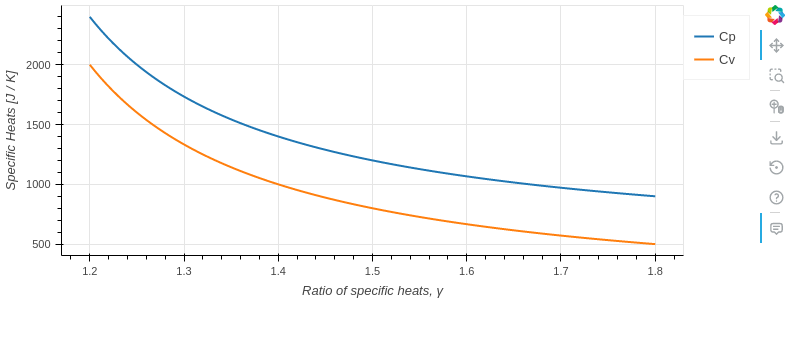
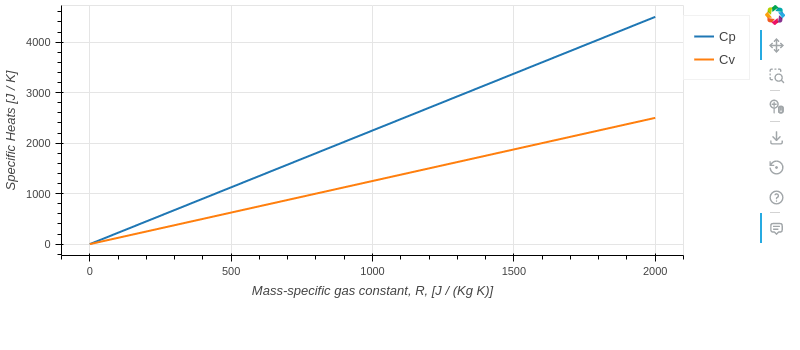
Plot the relationships Cp=f(gamma, R) and Cv=f(gamma, R).
- Parameters:
- figurebokeh.plotting._figure.figure
- allow_None:
True
The Bokeh figure to populate
- sizeTuple
- allow_None:
True
- default:
(800, 300)
- length:
2
Size of the plot, (width, height) in pixel.
- error_logString
- default:
Visualize any error that raises from the computation.
- colorsTuple
- default:
(‘#1f77b4’, ‘#ff7f0e’, ‘#2ca02c’, ‘#d62728’, ‘#9467bd’, ‘#8c564b’, ‘#e377c2’, ‘#7f7f7f’, ‘#bcbd22’, ‘#17becf’)
- length:
10
List of categorical colors.
- legendbokeh.models.annotations.legends.Legend
- allow_None:
True
The legend, when placed outside of the plotting area.
- titleString
- default:
- x_labelString
- default:
M
- y_labelString
- default:
Ratios
- x_rangeRange
- allow_None:
True
- inclusive_bounds:
(True, True)
- length:
2
- y_rangeRange
- allow_None:
True
- inclusive_bounds:
(True, True)
- length:
2
- show_minor_gridBoolean
- default:
False
Toggle minor grid visibility.
- show_legend_outsideBoolean
- default:
True
If True, the legend will be moved outside of the plotting area. In doing so, the legend items will become clickable, allowing user to hide a particular line.
- selectSelector
- default:
1
- names:
{‘gamma - specific heats’: 0, ‘R - specific heats’: 1}
- objects:
[0, 1]
Chose which diagram to show.
- gammaNumber
- bounds:
1 < gamma <= 2
- default:
1.4
γ = Cp / Cv
- gamma_rangeRange
- bounds:
(1, 2)
- default:
(1.05, 2)
- inclusive_bounds:
(True, True)
- length:
2
γ = Cp / Cv
- RNumber
- bounds:
0 <= R <= 5000
- default:
287.05
[J / (Kg K)]
- R_rangeRange
- bounds:
(0, 5000)
- default:
(0, 5000)
- inclusive_bounds:
(True, True)
- length:
2
[J / (Kg K)]
- NInteger
- bounds:
N >= 10
- default:
100
Number of points for each curve. It affects the quality of the visualization as well as the speed of updates.
Examples
Show an interactive application:
from pygasflow.interactive.diagrams import GasDiagram
GasDiagram()
Set custom values to parameters and only show the figure:
from pygasflow.interactive.diagrams import GasDiagram
d = GasDiagram(select=0, gamma_range=(1.2, 1.8), R=400)
d.show_figure()
from pygasflow.interactive.diagrams import GasDiagram
d = GasDiagram(select=1, R_range=(0, 2000), gamma=1.8)
d.show_figure()
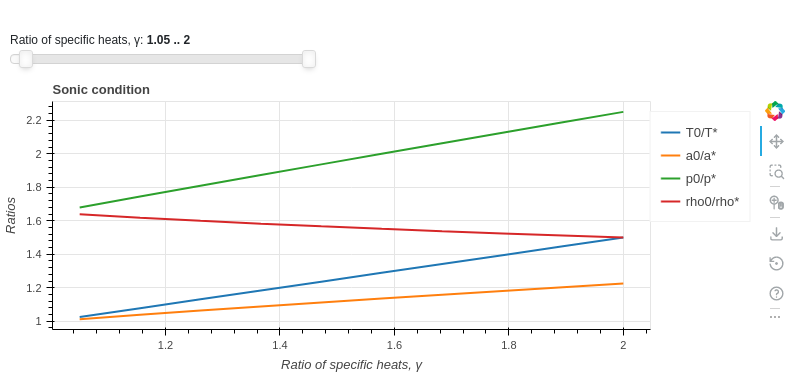
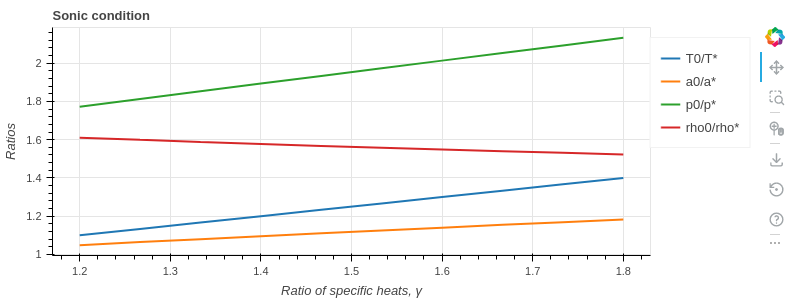
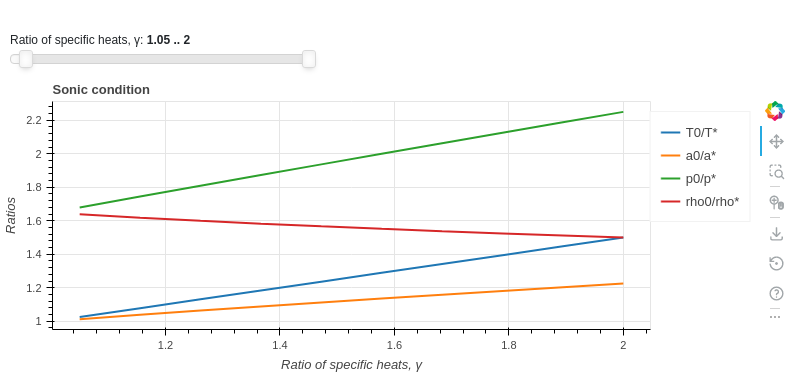
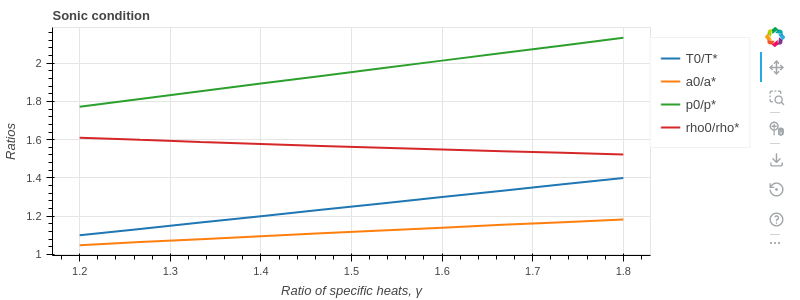
- class pygasflow.interactive.diagrams.SonicDiagram(*, N, gamma_range, tooltips, _theme, _update_func, colors, error_log, figure, legend, show_legend_outside, show_minor_grid, size, title, x_label, x_range, y_label, y_range, name)[source]
Plot the sonic conditions T0/T*=f(gamma), a0/a*=f(gamma), p0/p*=f(gamma), rho0/rhoT*=f(gamma).
- Parameters:
- figurebokeh.plotting._figure.figure
- allow_None:
True
The Bokeh figure to populate
- sizeTuple
- allow_None:
True
- default:
(800, 300)
- length:
2
Size of the plot, (width, height) in pixel.
- error_logString
- default:
Visualize any error that raises from the computation.
- colorsTuple
- default:
(‘#1f77b4’, ‘#ff7f0e’, ‘#2ca02c’, ‘#d62728’, ‘#9467bd’, ‘#8c564b’, ‘#e377c2’, ‘#7f7f7f’, ‘#bcbd22’, ‘#17becf’)
- length:
10
List of categorical colors.
- legendbokeh.models.annotations.legends.Legend
- allow_None:
True
The legend, when placed outside of the plotting area.
- titleString
- default:
- x_labelString
- default:
M
- y_labelString
- default:
Ratios
- x_rangeRange
- allow_None:
True
- inclusive_bounds:
(True, True)
- length:
2
- y_rangeRange
- allow_None:
True
- inclusive_bounds:
(True, True)
- length:
2
- show_minor_gridBoolean
- default:
False
Toggle minor grid visibility.
- show_legend_outsideBoolean
- default:
True
If True, the legend will be moved outside of the plotting area. In doing so, the legend items will become clickable, allowing user to hide a particular line.
- gamma_rangeRange
- bounds:
(1, 2)
- default:
(1.05, 2)
- inclusive_bounds:
(True, True)
- length:
2
γ = Cp / Cv
- NInteger
- bounds:
N >= 10
- default:
100
Number of points for each curve. It affects the quality of the visualization as well as the speed of updates.
- tooltipsList
-
Tooltips used on each line of the plot.
Examples
Show an interactive application:
from pygasflow.interactive.diagrams import SonicDiagram
SonicDiagram()
Set custom values to parameters and only show the figure:
from pygasflow.interactive.diagrams import SonicDiagram
d = SonicDiagram(gamma_range=(1.2, 1.8))
d.show_figure()
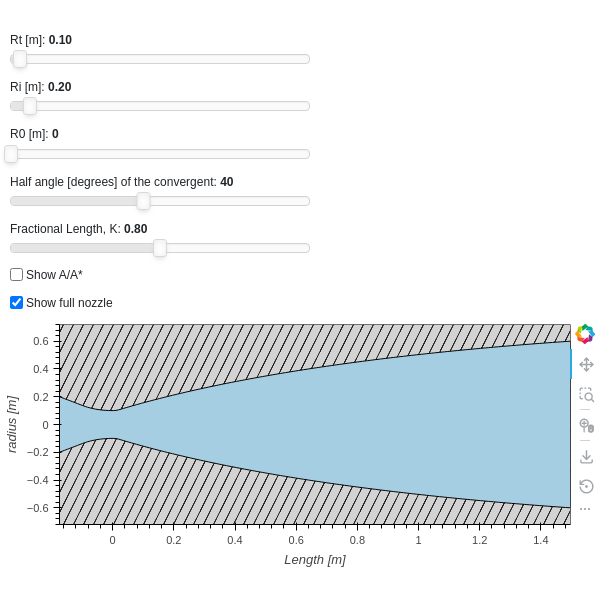
- class pygasflow.interactive.diagrams.NozzleDiagram(*, characteristic_cmap, characteristic_scatter_kwargs, nozzle, show_area_ratio, show_characteristic_lines, show_divergent_only, show_full_nozzle, _theme, _update_func, colors, error_log, figure, legend, show_legend_outside, show_minor_grid, size, title, x_label, x_range, y_label, y_range, name)[source]
Draw a representation of a nozzle.
- Parameters:
- figurebokeh.plotting._figure.figure
- allow_None:
True
The Bokeh figure to populate
- sizeTuple
- allow_None:
True
- default:
(800, 300)
- length:
2
Size of the plot, (width, height) in pixel.
- error_logString
- default:
Visualize any error that raises from the computation.
- colorsTuple
- default:
(‘#1f77b4’, ‘#ff7f0e’, ‘#2ca02c’, ‘#d62728’, ‘#9467bd’, ‘#8c564b’, ‘#e377c2’, ‘#7f7f7f’, ‘#bcbd22’, ‘#17becf’)
- length:
10
List of categorical colors.
- legendbokeh.models.annotations.legends.Legend
- allow_None:
True
The legend, when placed outside of the plotting area.
- titleString
- default:
- x_labelString
- default:
M
- y_labelString
- default:
Ratios
- x_rangeRange
- allow_None:
True
- inclusive_bounds:
(True, True)
- length:
2
- y_rangeRange
- allow_None:
True
- inclusive_bounds:
(True, True)
- length:
2
- show_minor_gridBoolean
- default:
False
Toggle minor grid visibility.
- show_legend_outsideBoolean
- default:
True
If True, the legend will be moved outside of the plotting area. In doing so, the legend items will become clickable, allowing user to hide a particular line.
- nozzlepygasflow.nozzles.nozzle_geometry.Nozzle_Geometry
- allow_None:
True
- show_area_ratioBoolean
- default:
False
If True show \(\frac{A}{A^{*}}\), otherwise shows the radius
- show_full_nozzleBoolean
- default:
False
If False, only show the positive y-coordinate.
- show_divergent_onlyBoolean
- default:
False
- show_characteristic_linesBoolean
- default:
False
Only used in MOC nozzles.
- characteristic_scatter_kwargsDict
- default:
{}
Rendering keywords for the scatter about characteristi lines.
- characteristic_cmap(list, tuple, str)
- allow_None:
True
A sequence of colors to use as the target palette for mapping.
This property can also be set as a String, to the name of any of the palettes shown in bokeh.palettes.
If not provided, colorcet.bmy will be used.
Examples
Show an interactive application:
from pygasflow.interactive.diagrams import NozzleDiagram
from pygasflow.nozzles import CD_TOP_Nozzle
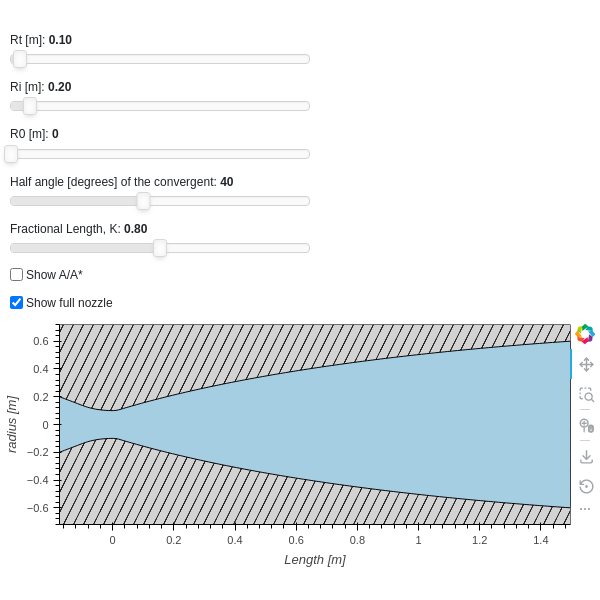
nozzle = CD_TOP_Nozzle(Ri=0.2, Rt=0.1, Re=0.6, K=0.8)
NozzleDiagram(nozzle=nozzle, show_full_nozzle=True)
Set custom values to parameters and only show the figure:
from pygasflow.interactive.diagrams import NozzleDiagram
from pygasflow.nozzles import CD_Min_Length_Nozzle
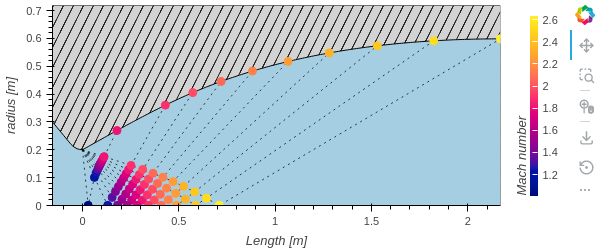
nozzle = CD_Min_Length_Nozzle(Ri=0.3, Rt=0.2, Re=0.6)
d = NozzleDiagram(nozzle=nozzle, show_characteristic_lines=True)
d.show_figure()
- class pygasflow.interactive.diagrams.DeLavalDiagram(*, _show_all_ui_controls, labels, nozzle_diagram, show_nozzle, solver, tooltips, _theme, _update_func, colors, error_log, figure, legend, show_legend_outside, show_minor_grid, size, title, x_label, x_range, y_label, y_range, name)[source]
Plot M, \(\frac{P}{P_{0}}\), \(\frac{T}{T_{0}}\), \(\frac{\rho}{\rho_{0}}\) along the length of a convergent-divergent nozzle.
- Parameters:
- figurebokeh.plotting._figure.figure
- allow_None:
True
The Bokeh figure to populate
- sizeTuple
- allow_None:
True
- default:
(800, 300)
- length:
2
Size of the plot, (width, height) in pixel.
- error_logString
- default:
Visualize any error that raises from the computation.
- colorsTuple
- default:
(‘#1f77b4’, ‘#ff7f0e’, ‘#2ca02c’, ‘#d62728’, ‘#9467bd’, ‘#8c564b’, ‘#e377c2’, ‘#7f7f7f’, ‘#bcbd22’, ‘#17becf’)
- length:
10
List of categorical colors.
- legendbokeh.models.annotations.legends.Legend
- allow_None:
True
The legend, when placed outside of the plotting area.
- titleString
- default:
- x_labelString
- default:
M
- y_labelString
- default:
Ratios
- x_rangeRange
- allow_None:
True
- inclusive_bounds:
(True, True)
- length:
2
- y_rangeRange
- allow_None:
True
- inclusive_bounds:
(True, True)
- length:
2
- show_minor_gridBoolean
- default:
False
Toggle minor grid visibility.
- show_legend_outsideBoolean
- default:
True
If True, the legend will be moved outside of the plotting area. In doing so, the legend items will become clickable, allowing user to hide a particular line.
- solverpygasflow.solvers.de_laval.De_Laval_Solver
- allow_None:
True
The solver instance.
- tooltipsList
- default:
[(‘Variable’, ‘@v’), (‘Length’, ‘@x’), (‘value’, ‘@y’)]
Tooltips used on each line of the plot.
- labelsList
- default:
[]
Labels to be used on the legend.
- show_nozzleBoolean
- default:
True
- nozzle_diagrampygasflow.interactive.diagrams.nozzle.NozzleDiagram
- allow_None:
True
The nozzle diagram instance to be shown.
Examples
Show an interactive application:
from pygasflow.interactive.diagrams import DeLavalDiagram
from pygasflow.nozzles import CD_TOP_Nozzle
from pygasflow.solvers import De_Laval_Solver
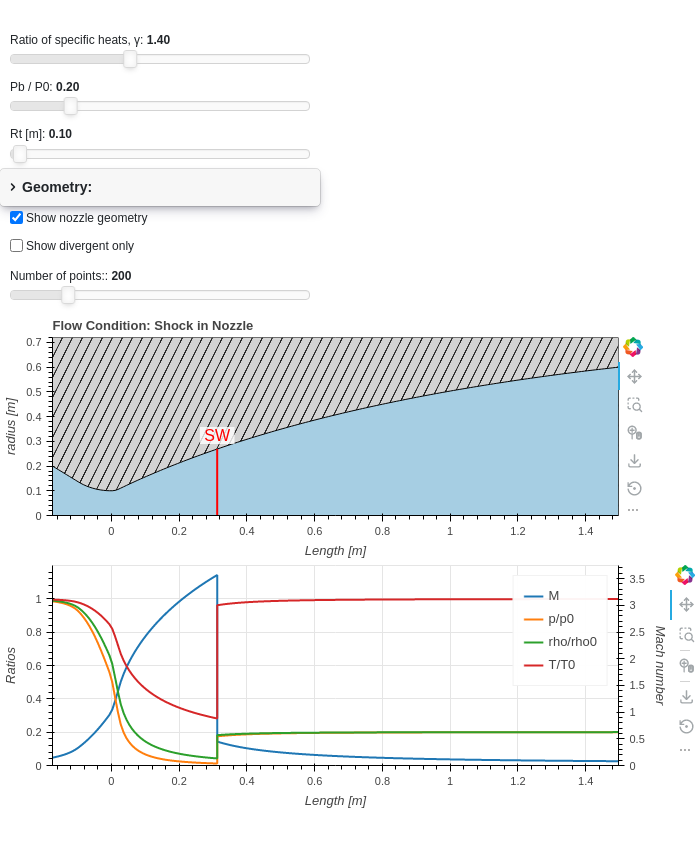
nozzle = CD_TOP_Nozzle(Ri=0.2, Rt=0.1, Re=0.6, K=0.8)
solver = De_Laval_Solver(
    gamma=1.4, R=287.05, T0=500, P0=101325,
    Pb_P0_ratio=0.2, nozzle=nozzle
)
DeLavalDiagram(solver=solver)
Only show the figure the solutions along the length of the nozzle:
from pygasflow.interactive.diagrams import DeLavalDiagram
from pygasflow.nozzles import CD_TOP_Nozzle
from pygasflow.solvers import De_Laval_Solver
nozzle = CD_TOP_Nozzle(Ri=0.2, Rt=0.1, Re=0.6, K=0.8)
solver = De_Laval_Solver(
    gamma=1.4, R=287.05, T0=500, P0=101325,
    Pb_P0_ratio=0.2, nozzle=nozzle
)
d = DeLavalDiagram(
    solver=solver,
    show_nozzle=False,
    title="Flow in a Thrust Optimized Parabolic nozzle."
)
d.show_figure()